Global Warming
97% of Climate Science Papers Agree Warming is Man-Made
What is it? • Factors • Trends & Effects • FAQ • Where Do I Learn More?
* For a quick overview of the statistics *
* For a quick overview of the statistics *
 German Translation provided by uhrenstore.de
What is it?
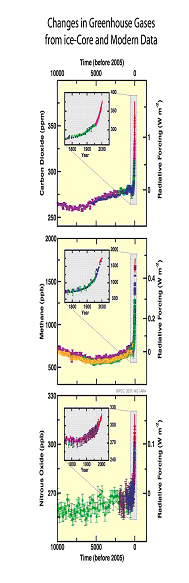 Graphics from Intergovernmental Panel on Climate Change Report Summary Graphics from Intergovernmental Panel on Climate Change Report Summary |
Average global temperatures may increase by 1.4-5.8ºC (that's 2.5 - 10.4º F) by the end of the 21st century. Although the numbers sound small, they can trigger significant changes in climate. (The difference between global temperatures during an Ice Age and an ice-free period is only about 5ºC.) Besides resulting in more hot days, many scientists believe an increase in temperatures may lead to changes in precipitation and weather patterns. Warmer ocean water may result in more intense and frequent tropical storms and hurricanes. Sea levels are also expected to increase by 0.09 - 0.88 m. in the next century, mainly from melting glaciers and expanding seawater . Global Warming may also affect wildlife and species that cannot survive in warmer environments may become extinct. Finally, human health is also at stake, as global Climate Change may result in the spreading of certain diseases such as malaria, the flooding of major cities, a greater risk of heat stroke for individuals, and poor air quality.
Climate change is very likely having an impact now on our planet and its life, according to the latest installment of a report published by the Intergovernmental Panel on Climate Change (IPCC). And the future problems caused by rising seas, growing deserts, and more frequent droughts all look set to affect the developing world more than rich countries, they add. The report is the second chapter of the IPCC's Fourth Assessment -- the most comprehensive summary yet of research into the causes and effects of climate change. To read more, visit Effects of climate change tallied up.
Factors
Greenhouse Gases
The increase in greenhouse gases caused by human activity is often cited as one of the major causes of global warming. These greenhouse gases reabsorb heat reflected from the Earth's surface, thus trapping the heat in our atmosphere. This natural process is essential for life on Earth because it plays an important role in regulating the Earth's temperature. However, over the last several hundred years, humans have been artificially increasing the concentration of these gases, mainly carbon dioxide and methane in the Earth's atmosphere. These gases build up and prevent additional thermal radiation from leaving the Earth, thereby trapping excess heat.
Solar Variability & Global Warming
 During the initial discovery period of global climate change, the magnitude of the influence of the Sun on Earth's climate was not well understood. Since the early 1990s, however, extensive research was put into determining what role, if any, the Sun has in global warming or climate change.
A recent review paper, put together by both solar and climate scientists, details these studies: Solar Influences on Climate. Their bottom line: though the Sun may play some small role, "it is nevertheless much smaller than the estimated radiative forcing due to anthropogenic changes." That is, human activities are the primary factor in global climate change.
Greenhouse Gases
The increase in greenhouse gases caused by human activity is often cited as one of the major causes of global warming. These greenhouse gases reabsorb heat reflected from the Earth's surface, thus trapping the heat in our atmosphere. This natural process is essential for life on Earth because it plays an important role in regulating the Earth's temperature. However, over the last several hundred years, humans have been artificially increasing the concentration of these gases, mainly carbon dioxide and methane in the Earth's atmosphere. These gases build up and prevent additional thermal radiation from leaving the Earth, thereby trapping excess heat.
Solar Variability & Global Warming
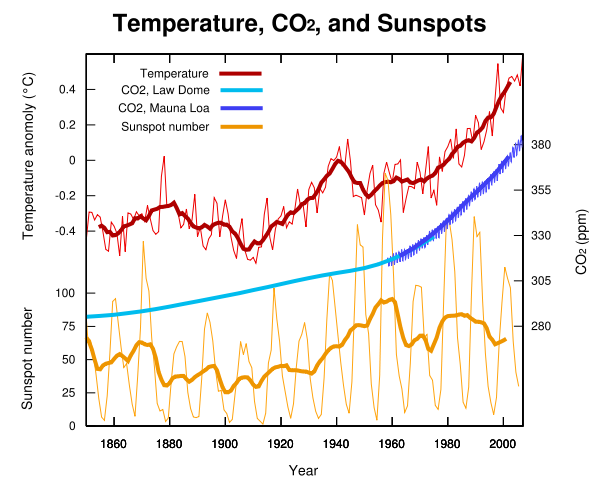 During the initial discovery period of global climate change, the magnitude of the influence of the Sun on Earth's climate was not well understood. Since the early 1990s, however, extensive research was put into determining what role, if any, the Sun has in global warming or climate change.
A recent review paper, put together by both solar and climate scientists, details these studies: Solar Influences on Climate. Their bottom line: though the Sun may play some small role, "it is nevertheless much smaller than the estimated radiative forcing due to anthropogenic changes." That is, human activities are the primary factor in global climate change.
 Solar irradiance changes have been measured reliably by satellites for only 30 years. These precise observations show changes of a few tenths of a percent that depend on the level of activity in the 11-year solar cycle. Changes over longer periods must be inferred from other sources. Estimates of earlier variations are important for calibrating the climate models. While a component of recent global climate change may have been caused by the increased solar activity of the last solar cycle, that component was very small compared to the effects of additional greenhouse gases. According to a NASA Goddard Institute for Space Studies (GISS) press release, "...the solar increases do not have the ability to cause large global temperature increases...greenhouse gases are indeed playing the dominant role..." The effects of global climate change are apparent (see section below) despite the fact that the Sun is once again less bright during the present solar minimum. Since the last solar minimum of 1996, the Sun's brightness has decreased by 0.02% at visible wavelengths, and 6% at extreme UV wavelengths, representing a 12-year low in solar irradiance, according to this NASA news article(April 1, 2009). Also, be sure to read this more recent article: 2009: Second Warmest Year on Record; End of Warmest Decade.
For January-June of 2010, the global temperature average was 57.5 degrees Fahrenheit - the warmest first half-year since records began in 1880, though it remains yet to be seen whether the next six months will make this year the warmest on record. (Link: First Half of 2010 Warmest on Record). Still, according to NOAA, "each of the 10 warmest average global temperatures recorded since 1880 have occurred in the last fifteen years" - Link.
More data available on NOAA's State of the Climate Website where you can view monthly climate reports.
Back to Top
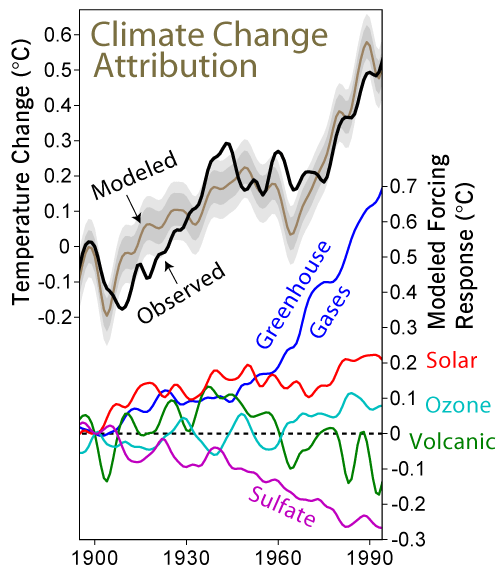 Image created by Robert A. Rohde / Global Warming Art Image created by Robert A. Rohde / Global Warming Artglobalwarmingart.com | The United Nations Intergovernmental Panel on Climate Change has been studying global warming for years. Their most recent report, issed in February 2007, (see Climate Change 2007: The Physical Science Basis (summary for policymakers), U.N. Report Confirms Human Activity to Blame for Earth's Warming Climate (from Voice of America), and Intergovernmental Panel on Climate Change), concludes that "The global increases in carbon dioxide concentration are due primarily to fossil fuel use and land-use change, while those of methane and nitrous exide are primarily due to agriculture." The report goes on to note that these findings come with a "very high confidence rate [words emphasized in italics in the report summary] that the globally averaged net effect of human activities since 1750 has been one of warming." |
The American Meteorological Society, which promotes the development and dissemination of information and education on the atmospheric and related oceanic and hydrologic sciences, has also issued a statement on global changes.
For more information on the impact of global climate change, see the "Impacts, Adaptation and Vulnerability" section from the IPCC Fourth Assessment Report: Climate Change 2007. You can find the technical summary here.
Additional discussion on current and potential future effects and feedback mechanisms can be found here: Effects of global warming.
SIMPLIFIED RESEARCH
A magnet is
any substance that can attract certain types of material known as magnetic
substances.
A magnetic
field is a region around a magnet in which a magnetic force is experienced.
Neutral
point is a point in a magnetic field where no magnetic force is experienced.
A magnetic
flux is a line in a magnet field showing the path of a magnetic field.
FEATURES OF
A MAGNET INCLUDE:
<!--[if !supportLists]-->1. <!--[endif]-->It has north and south poles.
<!--[if !supportLists]-->2. <!--[endif]-->When the magnet is at rest it points
to the north.
<!--[if !supportLists]-->3. <!--[endif]-->Like poles repel and unlike poles
attract.
Magnetic
compass is a compass consisting of a small needle magnetic needle, which can
rotate on a pivot and finally point to the north.
METHODS OF
<!--[if !supportLists]-->1. <!--[endif]-->Stroking
<!--[if !supportLists]-->2. <!--[endif]-->Induction
<!--[if !supportLists]-->3. <!--[endif]-->Electricity
RME
The bible
has 66 books and was written by 40 different authors over a period of 1500
years.
The New
Testament was first written in Greek.
The highest
mode of revelation in Islam is the word “revelation”.
The Quran
has about 6638 verses.
ICT
The rows in excel are 65,536.
The columns in excel are 256.
A cell is the creation of a box-like
shape as the result of the intersection of a column and row.
A column refers to a horizontal strip
of cells lettered A-Z in excel.
CONTINUATION OF A MAGNET
ADSL - Asymmetric Digital Subscriber Line
AGP - Accelerated Graphics Port
ALI - Acer Labs, Incorporated
ALU - Arithmetic Logic Unit
AMD - Advanced Micro Devices
APC - American Power Conversion
ASCII - American Standard Code for Information Interchange
ASIC - Application Specific Integrated Circuit
ASPI - Advanced SCSI Programming Interface
AT - Advanced Technology
ATI - ATI Technologies Inc.
ATX - Advanced Technology Extended
--- B ---
BFG - BFG Technologies
BIOS - Basic Input Output System
BNC - Barrel Nut Connector
--- C ---
CAS - Column Address Signal
CD - Compact Disk
CDR - Compact Disk Recorder
CDRW - Compact Disk Re-Writer
CD-ROM - Compact Disk - Read Only Memory
CFM - Cubic Feet per Minute (ft�/min)
CMOS - Complementary Metal Oxide Semiconductor
CPU - Central Processing Unit
CTX - CTX Technology Corporation (Commited to Excellence)
--- D ---
DDR - Double Data Rate
DDR-SDRAM - Double Data Rate - Synchronous Dynamic Random Access Memory
DFI - DFI Inc. (Design for Innovation)
DIMM - Dual Inline Memory Module
DRAM - Dynamic Random Access Memory
DPI - Dots Per Inch
DSL - See ASDL
DVD - Digital Versatile Disc
DVD-RAM - Digital Versatile Disk - Random Access Memory
--- E ---
ECC - Error Correction Code
ECS - Elitegroup Computer Systems
EDO - Extended Data Out
EEPROM - Electrically Erasable Programmable Read-Only Memory
EPROM - Erasable Programmable Read-Only Memory
EVGA - EVGA Corporation
--- F ---
FC-PGA - Flip Chip Pin Grid Array
FDC - Floppy Disk Controller
FDD - Floppy Disk Drive
FPS - Frame Per Second
FPU - Floating Point Unit
FSAA - Full Screen Anti-Aliasing
FS - For Sale
FSB - Front Side Bus
--- G ---
GB - Gigabytes
GBps - Gigabytes per second or Gigabits per second
GDI - Graphical Device Interface
GHz - GigaHertz
--- H ---
HDD - Hard Disk Drive
HIS - Hightech Information System Limited
HP - Hewlett-Packard Development Company
HSF - Heatsink-Fan
--- I ---
IBM - International Business Machines Corporation
IC - Integrated Circuit
IDE - Integrated Drive Electronics
IFS- Item for Sale
IRQ - Interrupt Request
ISA - Industry Standard Architecture
ISO - International Standards Organization
--- J ---
JBL - JBL (Jame B. Lansing) Speakers
JVC - JVC Company of America
- K ---
Kbps - Kilobits Per Second
KBps - KiloBytes per second
--- L ---
LG - LG Electronics
LAN - Local Are Network
LCD - Liquid Crystal Display
LDT - Lightning Data Transport
LED - Light Emitting Diode
--- M ---
MAC - Media Access Control
MB � MotherBoard or Megabyte
MBps - Megabytes Per Second
Mbps - Megabits Per Second or Megabits Per Second
MHz - MegaHertz
MIPS - Million Instructions Per Second
MMX - Multi-Media Extensions
MSI - Micro Star International
--- N ---
NAS - Network Attached Storage
NAT - Network Address Translation
NEC - NEC Corporation
NIC - Network Interface Card
--- O ---
OC - Overclock (Over Clock)
OCZ - OCZ Technology
OEM - Original Equipment Manufacturer
--- P ---
PC - Personal Computer
PCB - Printed Circuit Board
PCI - Peripheral Component Interconnect
PDA - Personal Digital Assistant
PCMCIA - Peripheral Component Microchannel Interconnect Architecture
PGA - Professional Graphics Array
PLD - Programmable Logic Device
PM - Private Message / Private Messaging
PnP - Plug 'n Play
PNY - PNY Technology
POST - Power On Self Test
PPPoA - Point-to-Point Protocol over ATM
PPPoE - Point-to-Point Protocol over Ethernet
PQI - PQI Corporation
PSU - Power Supply Unit
--- R ---
RAID - Redundant Array of Inexpensive Disks
RAM - Random Access Memory
RAMDAC - Random Access Memory Digital Analog Convertor
RDRAM - Rambus Dynamic Random Access Memory
ROM - Read Only Memory
RPM - Revolutions Per Minute
--- S ---
SASID - Self-scanned Amorphous Silicon Integrated Display
SCA - SCSI Configured Automatically
SCSI - Small Computer System Interface
SDRAM - Synchronous Dynamic Random Access Memory
SECC - Single Edge Contact Connector
SODIMM - Small Outline Dual Inline Memory Module
SPARC - Scalable Processor ArChitecture
SOHO - Small Office Home Office
SRAM - Static Random Access Memory
SSE - Streaming SIMD Extensions
SVGA - Super Video Graphics Array
S/PDIF - Sony/Philips Digital Interface
--- T ---
TB - Terabytes
TBps - Terabytes per second
Tbps - Terabits per second
TDK - TDK Electronics
TEC - Thermoelectric Cooler
TPC - TipidPC
TWAIN - Technology Without An Important Name
--- U ---
UART - Universal Asynchronous Receiver/Transmitter
USB - Universal Serial Bus
UTP - Unshieled Twisted Pair
--- V ---
VCD - Video CD
VPN - Virtual Private Network
--- W ---
WAN - Wide Area Network
WTB - Want to Buy
WYSIWYG - What You See Is What You Get
--- X ---
XGA - Extended Graphics Array
XFX - XFX Graphics, a Division of Pine
XMS - Extended Memory Specification
XT - Extended Technology
Why an owl sees at night.

Cross-section of an Owl's Eye
General Keyboard Shortcuts, General Keyboard Shortcuts
General Keyboard Shortcuts
CTRL+C (Copy)
CTRL+X (Cut)
CTRL+V (Paste)
CTRL+Z (Undo)
DELETE (Delete)
SHIFT+DELETE (Delete the selected item permanently without placing the item in the Recycle Bin)
CTRL while dragging an item (Copy the selected item)
CTRL+SHIFT while dragging an item (Create a shortcut to the selected item)
F2 key (Rename the selected item)
CTRL+RIGHT ARROW (Move the insertion point to the beginning of the next word)
CTRL+LEFT ARROW (Move the insertion point to the beginning of the previous word)
CTRL+DOWN ARROW (Move the insertion point to the beginning of the next paragraph)
CTRL+UP ARROW (Move the insertion point to the beginning of the previous paragraph)
CTRL+SHIFT with any of the arrow keys (Highlight a block of text)
SHIFT with any of the arrow keys (Select more than one item in a window or on the desktop, or select text in a document)
CTRL+A (Select all)
F3 key (Search for a file or a folder)
ALT+ENTER (View the properties for the selected item)
ALT+F4 (Close the active item, or quit the active program)
ALT+ENTER (Display the properties of the selected object)
ALT+SPACEBAR (Open the shortcut menu for the active window)
CTRL+F4 (Close the active document in programs that enable you to have multiple documents open simultaneously)
ALT+TAB (Switch between the open items)
ALT+ESC (Cycle through items in the order that they had been opened)
F6 key (Cycle through the screen elements in a window or on the desktop)
F4 key (Display the Address bar list in My Computer or Windows Explorer)
SHIFT+F10 (Display the shortcut menu for the selected item)
ALT+SPACEBAR (Display the System menu for the active window)
CTRL+ESC (Display the Start menu)
ALT+Underlined letter in a menu name (Display the corresponding menu)
Underlined letter in a command name on an open menu (Perform the corresponding command)
F10 key (Activate the menu bar in the active program)
RIGHT ARROW (Open the next menu to the right, or open a submenu)
LEFT ARROW (Open the next menu to the left, or close a submenu)
F5 key (Update the active window)
BACKSPACE (View the folder one level up in My Computer or Windows Explorer)
ESC (Cancel the current task)
SHIFT when you insert a CD-ROM into the CD-ROM drive (Prevent the CD-ROM from automatically playing)
Dialog Box Keyboard Shortcuts
CTRL+TAB (Move forward through the tabs)
CTRL+SHIFT+TAB (Move backward through the tabs)
TAB (Move forward through the options)
SHIFT+TAB (Move backward through the options)
ALT+Underlined letter (Perform the corresponding command or select the corresponding option)
ENTER (Perform the command for the active option or button)
SPACEBAR (Select or clear the check box if the active option is a check box)
Arrow keys (Select a button if the active option is a group of option buttons)
F1 key (Display Help)
F4 key (Display the items in the active list)
BACKSPACE (Open a folder one level up if a folder is selected in the Save As or Open dialog box)
Microsoft Natural Keyboard Shortcuts
Windows Logo (Display or hide the Start menu)
Windows Logo+BREAK (Display the System Properties dialog box)
Windows Logo+D (Display the desktop)
Windows Logo+M (Minimize all of the windows)
Windows Logo+SHIFT+M (Restore the minimized windows)
Windows Logo+E (Open My Computer)
Windows Logo+F (Search for a file or a folder)
CTRL+Windows Logo+F (Search for computers)
Windows Logo+F1 (Display Windows Help)
Windows Logo+ L (Lock the keyboard)
Windows Logo+R (Open the Run dialog box)
Windows Logo+U (Open Utility Manager)
Accessibility Keyboard Shortcuts
Right SHIFT for eight seconds (Switch FilterKeys either on or off)
Left ALT+left SHIFT+PRINT SCREEN (Switch High Contrast either on or off)
Left ALT+left SHIFT+NUM LOCK (Switch the MouseKeys either on or off)
SHIFT five times (Switch the StickyKeys either on or off)
NUM LOCK for five seconds (Switch the ToggleKeys either on or off)
Windows Logo +U (Open Utility Manager)
Windows Explorer Keyboard Shortcuts
END (Display the bottom of the active window)
HOME (Display the top of the active window)
NUM LOCK+Asterisk sign (*) (Display all of the subfolders that are under the selected folder)
NUM LOCK+Plus sign (+) (Display the contents of the selected folder)
NUM LOCK+Minus sign (-) (Collapse the selected folder)
LEFT ARROW (Collapse the current selection if it is expanded, or select the parent folder)
RIGHT ARROW (Display the current selection if it is collapsed, or select the first subfolder)
Shortcut Keys for Character Map
After you double-click a character on the grid of characters, you can move through the grid by using the keyboard shortcuts:
RIGHT ARROW (Move to the right or to the beginning of the next line)
LEFT ARROW (Move to the left or to the end of the previous line)
UP ARROW (Move up one row)
DOWN ARROW (Move down one row)
PAGE UP (Move up one screen at a time)
PAGE DOWN (Move down one screen at a time)
HOME (Move to the beginning of the line)
END (Move to the end of the line)
CTRL+HOME (Move to the first character)
CTRL+END (Move to the last character)
SPACEBAR (Switch between Enlarged and Normal mode when a character is selected)
Microsoft Management Console (MMC) Main Window Keyboard Shortcuts
CTRL+O (Open a saved console)
CTRL+N (Open a new console)
CTRL+S (Save the open console)
CTRL+M (Add or remove a console item)
CTRL+W (Open a new window)
F5 key (Update the content of all console windows)
ALT+SPACEBAR (Display the MMC window menu)
ALT+F4 (Close the console)
ALT+A (Display the Action menu)
ALT+V (Display the View menu)
ALT+F (Display the File menu)
ALT+O (Display the Favorites menu)
MMC Console Window Keyboard Shortcuts
CTRL+P (Print the current page or active pane)
ALT+Minus sign (-) (Display the window menu for the active console window)
SHIFT+F10 (Display the Action shortcut menu for the selected item)
F1 key (Open the Help topic, if any, for the selected item)
F5 key (Update the content of all console windows)
CTRL+F10 (Maximize the active console window)
CTRL+F5 (Restore the active console window)
ALT+ENTER (Display the Properties dialog box, if any, for the selected item)
F2 key (Rename the selected item)
CTRL+F4 (Close the active console window. When a console has only one console window, this shortcut closes the console)
Remote Desktop Connection Navigation
CTRL+ALT+END (Open the Microsoft Windows NT Security dialog box)
ALT+PAGE UP (Switch between programs from left to right)
ALT+PAGE DOWN (Switch between programs from right to left)
ALT+INSERT (Cycle through the programs in most recently used order)
ALT+HOME (Display the Start menu)
CTRL+ALT+BREAK (Switch the client computer between a window and a full screen)
ALT+DELETE (Display the Windows menu)
CTRL+ALT+Minus sign (-) (Place a snapshot of the active window in the client on the Terminal server clipboard and provide the same functionality as pressing PRINT SCREEN on a local computer.)
CTRL+ALT+Plus sign (+) (Place a snapshot of the entire client window area on the Terminal server clipboard and provide the same functionality as pressing ALT+PRINT SCREEN on a local computer.)
Microsoft Internet Explorer Navigation
CTRL+B (Open the Organize Favorites dialog box)
CTRL+E (Open the Search bar)
CTRL+F (Start the Find utility)
CTRL+H (Open the History bar)
CTRL+I (Open the Favorites bar)
CTRL+L (Open the Open dialog box)
CTRL+N (Start another instance of the browser with the same Web address)
CTRL+O (Open the Open dialog box, the same as CTRL+L)
CTRL+P (Open the Print dialog box)
CTRL+R (Update the current Web page)
CTRL+W (Close the current window)\
BIG VOCABULARY
adulterate - to make impure by adding bogus ingredients.
debase - same as adulterate.
inoculate - inject an immunizing agent into.
nebulous - cloudy, hazy, confused.
exorbitant - excessive, inordinate, going beyond usual or proper bounds.
esoteric - understood by a select few. secret; mysterious.
disparity - essentially different, unequal.
addendum - something that is added. as in to the back of a book.
fetid - having an offensive stench.
fastidious - hard to please, over nice.
lambasting - whacking or pounding
insipid - dull, flavorless
impeccable - without fault or blemish, perfect.
tenure - The holding of something, as in property, office, etc.
transpire - emit, exhale or perspire, happen occur.
predisposition - innate tendency.
innate - existing in one from birth.
pernicious - Highly destructive.
perplexity - problem, puzzled, make confused.
simpatico - congenial.
conjugate - formed in a pair, coupled. inflection of verbs
effigy - a life size dummy or sculpture of a person.
inflammatory - serving to inflame. excite highly, make violent, aggravate.
paleolithic - pertaining to old stone age.
demitasse - small cup of black coffee.
demeanor - behavior
ironclad - armored
iridescent - glittering with changeable colors like a rainbow.
infirm - not in good health.
ingenuous - candid naive, free from guile. (gile)
sans - without.
ubiquitous - existing everywhere.
canny - wary, prudent.
cantankerous - perverse in disposition, ill natured.
persecute - harass, make suffer for divergent principals.
persnickety - excessively meticulous.
appease - satisfy an appetite or demand.
verbose -wordy.
reverent - respectful; devout.
irreverent - disrespectful
paradigm - a list of the inflected forms of a word.
inflect - turn from a direct course; bend.
guile - cunning.
cursory - hasty and superficial a glance
fortuitous - coming by chance, accidental.
uncanny - weird.
candor - sincerity. ( I appreciate your candor)
proverbial - well known.
axiom - universal proposition. easily proved.
protuberant - bulging out. prominent. (J- you know this one)
diabolic - devilish. (diabolical)
sequester - put aside. (sequestered)
ornery - of ugly disposition, hard to manage.
myopic - near sightedness.
ad hoc - relating exclusively to the subject in question.
judicious - exercising sound judgment; prudent.
consortium - society, association. (con sor sheum)
caveat - a warning, let the buyer beware. (cav e ot)
peruse - read attentively. (a quick perusal) (per ooz)
smug - self satisfied.
sanctum - a private retreat. (sanctumoneous)
quasi - seemingly or almost, not wholly genuine. (kwa zee or kway zie)
innocuous - harmless. (meant to be an innocuous statement)
reticent - silent or reserved.
abate - beat down, diminish, lessen.
abash - make ashamed dispirited.
interim - an intervening time. the meantime. (in the interim)
amicable - friendly, peaceful.
amiable - pleasing, loving, friendly.
confabulate - converse.
conundrum - riddle or hard question.
qualm - sudden sensation of nausea, twinge of conscience. (kwaum)
compunction - same as qualm. slight regret or prick of conscience.
quarrel - dispute.
preamble - a preface, opening remarks.
precarious - uncertain, insecure.
incessant - continuing without interruption.
umbrage - resentment.
deplorable - lamentable, calamitous
calamity - disaster, a great misfortune.
lam'entable - regrettable.
specious - apparently, deceptive. (spee cious)
vicarious - substituting for, or feeling in place of, another.
symbiotic - living together of two different species harmoniously.
pabulum - food, insipid thoughts. (pab ya lum)
belay - stop.
sycophant - a servile flatterer.
sybarite - a self indulgent, luxury loving person.
obsequious - fawning, servile, deferential.
defunct - dead.
deference - submission to the judgement of another, respectful.
coquette - a flirt. (koe ket)
copious - abundant, plentiful. (koe pee ous)
disparage - discredit. (dis pair ij)
impious - profane, disrespectful, impiety. (im pee ous)
impecunious - without money, poor. (im pah kyou nee ous)
regimental - being under strict and uniform control.
regalia - emblems, insignia or personal finery.
nabob - very rich man, esp. who�s $ comes from the far east. (nay bob)
myrmidon - one who obeys or follows without question or scruple.
impetuous - impulse, incentive.
apropos - to the purpose, in reference to. adv. (ap rah poe)
effrontery - barefaced, impropriety, shamelesness, impudence
chutzpa - effrontery, gall (kuts pa)
impudence - gall, offensively forward in behavior, (impudent), insolent, saucy.
protean - readily assuming many shapes. (pro tee an)
protege - a person protected or aided by another.
enamored - inflame with love, captivate
oblique - slanting, indirectly aimed or expressed. askew.
opaque - cloudy
propriety - fitness, rightness, correct behavior, decorum.
decorum - the standards of conduct approved by society, propriety.
prosaic - unromantic, commonplace. (pro za ik)
decorous - well behaved, proper.
auspice - flavoring influence; protection. a favorable circumstance.
preclude - impede, prevent.
diminutive - very small or tiny, a small thing or person.
lexicon - a dictionary, special vocabulary.
imminent - likely to occur soon; impending.
eminent - high in rank, office, worth; conspicuous, noteworthy.
gambit - any apparent sacrafice in expectation of later gain.
gam - school of whales.
extrapolate - project on the basis of known data; surmise.
permutation - any possible arrangement of any units in a group.
percipient - perceiving.
parnassus - a center of or inspiration for poetic or artistic work.
gallivant - seek pleasure frivolously; gad about.
gad - ramble about idly. gadabout, gadder-travels aimlessly. gadfly.
goad - a sharp stick for driving cattle; to urge.
frivolous - not seriously intended. trivial. silly or giddy.
quagmire - area of muddy ground, marsh. difficult position or situation.
pukka - genuine, first rate.
ardent - fervent in feeling, intense, passionate. arduous - wearisome.
daunting - intimidating, dicouraging.
germane - closely allied, relevent.
relegate - send away or out of the way, consign, relegation.
tenacious - persistant in an opinion or view, stubborn.
tumultuous - violently disturbing, highly exciting.
pulchritude - beauty, (pul kri tood)
kudos - praise, glory, (cue tos)
inundate - flood, deluge, overwhelm.
sagacious - wise. sagacity. (sa gas city)
fusiform - spindle shaped, i.e. streamlined.
magdalene - reformed prostitute.
macabre - gruesome, dance of death, (ma kah bray)
godspeed - a wish for success and prosperity.
syllabus - compendium, an abstract.
sylph - imaginery being, a slender woman.
infallible - free from fallacy, trustworthy.
inexorable - not to be persuaded or moved. unrelenting.
arcane - secret.
jettison - Throw goods overboard to lighten a ship.
amatory - pertaining to lovemaking.
extenuate - make smaller in degree of appearance.
How to study math
Read more: How to Learn Math Fast | eHow.com http://www.ehow.com/how_2309618_learn-math-fast.html#ixzz2MHOCbtQg
Discovery and development
Main article: History of electromagnetism
See also: Magnetism history
Ancient people learned about magnetism from lodestones, naturally magnetized pieces of iron ore. They are naturally created magnets, which attract pieces of iron. The word magnet in Greek meant "stone from Magnesia", a part of ancient Greece where lodestones were found. Lodestones suspended so they could turn were the first magnetic compasses. The earliest known surviving descriptions of magnets and their properties are from Greece, India, and China around 2500 years ago.[1][2][3] The properties of lodestones and their affinity for iron were written of by Pliny the Elder in his encyclopedia Naturalis Historia.[4]
By the 12th to 13th centuries AD, magnetic compasses were used in navigation in China, Europe, and elsewhere.[5]
Background on the physics of magnetism and magnets
Magnetic field

Main article: Magnetic field
The magnetic flux density (also called magnetic B field or just magnetic field, usually denoted B) is a vector field. The magnetic B field vector at a given point in space is specified by two properties:
- Its direction, which is along the orientation of a compass needle.
- Its magnitude (also called strength), which is proportional to how strongly the compass needle orients along that direction.
Magnetic moment
Main article: Magnetic moment
A magnet's magnetic moment (also called magnetic dipole moment and usually denoted μ) is a vector that characterizes the magnet's overall magnetic properties. For a bar magnet, the direction of the magnetic moment points from the magnet's south pole to its north pole,[7] and the magnitude relates to how strong and how far apart these poles are. In SI units, the magnetic moment is specified in terms of A•m2.
A magnet both produces its own magnetic field and responds to magnetic fields. The strength of the magnetic field it produces is at any given point proportional to the magnitude of its magnetic moment. In addition, when the magnet is put into an external magnetic field, produced by a different source, it is subject to a torque tending to orient the magnetic moment parallel to the field.[8] The amount of this torque is proportional both to the magnetic moment and the external field. A magnet may also be subject to a force driving it in one direction or another, according to the positions and orientations of the magnet and source. If the field is uniform in space, the magnet is subject to no net force, although it is subject to a torque.[9]
A wire in the shape of a circle with area A and carrying current I is a magnet, with a magnetic moment of magnitude equal to IA.
Magnetization
Main article: Magnetization
The magnetization of a magnetized material is the local value of its magnetic moment per unit volume, usually denoted M, with units A/m.[10] It is a vector field, rather than just a vector (like the magnetic moment), because different areas in a magnet can be magnetized with different directions and strengths (for example, because of domains, see below). A good bar magnet may have a magnetic moment of magnitude 0.1 A•m2 and a volume of 1 cm3, or 1×10⁻⁶ m3, and therefore an average magnetization magnitude is 100,000 A/m. Iron can have a magnetization of around a million amperes per meter. Such a large value explains why iron magnets are so effective at producing magnetic fields.
Modelling magnets

See also: Two definitions of moment
Two different models exist for magnets: magnetic poles and atomic currents.
Although for many purposes it is convenient to think of a magnet as having distinct north and south magnetic poles, the concept of poles should not be taken literally: it is merely a way of referring to the two different ends of a magnet. The magnet does not have distinct north or south particles on opposing sides. If a bar magnet is broken into two pieces, in an attempt to separate the north and south poles, the result will be two bar magnets, each of which has both a north and south pole. However, a version of the magnetic-pole approach is used by professional magneticians to design permanent magnets.[citation needed] In this approach, the divergence of the magnetization ∇•M inside a magnet and the surface normal component M•n are treated as a distribution of magnetic monopoles. This is a mathematical convenience and does not imply that there are actually monopoles in the magnet. If the magnetic-pole distribution is known, then the pole model gives the magnetic field H. Outside the magnet, the field B is proportional to H, while inside the magnetization must be added to H. An extension of this method that allows for internal magnetic charges is used in theories of ferromagnetism.
Another model is the Ampère model, where all magnetization is due to the effect of microscopic, or atomic, circular bound currents, also called Ampèrian currents, throughout the material. For a uniformly magnetized cylindrical bar magnet, the net effect of the microscopic bound currents is to make the magnet behave as if there is a macroscopic sheet of electric current flowing around the surface, with local flow direction normal to the cylinder axis.[11] Microscopic currents in atoms inside the material are generally canceled by currents in neighboring atoms, so only the surface makes a net contribution; shaving off the outer layer of a magnet will not destroy its magnetic field, but will leave a new surface of uncancelled currents from the circular currents throughout the material.[12] The right-hand ruletells which direction the current flows.
Pole naming conventions
The north pole of a magnet is the pole that, when the magnet is freely suspended, points towards the Earth's North Magnetic Pole which is located in northern Canada. Since opposite poles (north and south) attract, the Earth's "North Magnetic Pole" is thus actually the south pole of the Earth's magnetic field.[13][14][15][16] As a practical matter, in order to tell which pole of a magnet is north and which is south, it is not necessary to use the Earth's magnetic field at all. For example, one method would be to compare it to an electromagnet, whose poles can be identified by the right-hand rule. The magnetic field lines of a magnet are considered by convention to emerge from the magnet's north pole and reenter at the south pole.[16]
Magnetic materials
Main article: Magnetism
The term magnet is typically reserved for objects that produce their own persistent magnetic field even in the absence of an applied magnetic field. Only certain classes of materials can do this. Most materials, however, produce a magnetic field in response to an applied magnetic field; a phenomenon known as magnetism. There are several types of magnetism, and all materials exhibit at least one of them.
The overall magnetic behavior of a material can vary widely, depending on the structure of the material, particularly on its electron configuration. Several forms of magnetic behavior have been observed in different materials, including:
- Ferromagnetic and ferrimagnetic materials are the ones normally thought of as magnetic; they are attracted to a magnet strongly enough that the attraction can be felt. These materials are the only ones that can retain magnetization and become magnets; a common example is a traditional refrigerator magnet. Ferrimagnetic materials, which include ferrites and the oldest magnetic materials magnetite and lodestone, are similar to but weaker than ferromagnetics. The difference between ferro- and ferrimagnetic materials is related to their microscopic structure, as explained in Magnetism.
- Paramagnetic substances, such as platinum, aluminum, and oxygen, are weakly attracted to either pole of a magnet. This attraction is hundreds of thousands of times weaker than that of ferromagnetic materials, so it can only be detected by using sensitive instruments or using extremely strong magnets. Magnetic ferrofluids, although they are made of tiny ferromagnetic particles suspended in liquid, are sometimes considered paramagnetic since they cannot be magnetized.
- Diamagnetic means repelled by both poles. Compared to paramagnetic and ferromagnetic substances, diamagnetic substances, such as carbon, copper, water, and plastic, are even more weakly repelled by a magnet. The permeability of diamagnetic materials is less than the permeability of a vacuum. All substances not possessing one of the other types of magnetism are diamagnetic; this includes most substances. Although force on a diamagnetic object from an ordinary magnet is far too weak to be felt, using extremely strong superconducting magnets, diamagnetic objects such as pieces of lead and even mice[17] can be levitated, so they float in mid-air. Superconductorsrepel magnetic fields from their interior and are strongly diamagnetic.
There are various other types of magnetism, such as spin glass, superparamagnetism, superdiamagnetism.
ICT ABBREVIATIONS
ADSL - Asymmetric Digital Subscriber Line
AGP - Accelerated Graphics Port
ALI - Acer Labs, Incorporated
ALU - Arithmetic Logic Unit
AMD - Advanced Micro Devices
APC - American Power Conversion
ASCII - American Standard Code for Information Interchange
ASIC - Application Specific Integrated Circuit
ASPI - Advanced SCSI Programming Interface
AT - Advanced Technology
ATI - ATI Technologies Inc.
ATX - Advanced Technology Extended
--- B ---
BFG - BFG Technologies
BIOS - Basic Input Output System
BNC - Barrel Nut Connector
--- C ---
CAS - Column Address Signal
CD - Compact Disk
CDR - Compact Disk Recorder
CDRW - Compact Disk Re-Writer
CD-ROM - Compact Disk - Read Only Memory
CFM - Cubic Feet per Minute (ft�/min)
CMOS - Complementary Metal Oxide Semiconductor
CPU - Central Processing Unit
CTX - CTX Technology Corporation (Commited to Excellence)
--- D ---
DDR - Double Data Rate
DDR-SDRAM - Double Data Rate - Synchronous Dynamic Random Access Memory
DFI - DFI Inc. (Design for Innovation)
DIMM - Dual Inline Memory Module
DRAM - Dynamic Random Access Memory
DPI - Dots Per Inch
DSL - See ASDL
DVD - Digital Versatile Disc
DVD-RAM - Digital Versatile Disk - Random Access Memory
--- E ---
ECC - Error Correction Code
ECS - Elitegroup Computer Systems
EDO - Extended Data Out
EEPROM - Electrically Erasable Programmable Read-Only Memory
EPROM - Erasable Programmable Read-Only Memory
EVGA - EVGA Corporation
--- F ---
FC-PGA - Flip Chip Pin Grid Array
FDC - Floppy Disk Controller
FDD - Floppy Disk Drive
FPS - Frame Per Second
FPU - Floating Point Unit
FSAA - Full Screen Anti-Aliasing
FS - For Sale
FSB - Front Side Bus
--- G ---
GB - Gigabytes
GBps - Gigabytes per second or Gigabits per second
GDI - Graphical Device Interface
GHz - GigaHertz
--- H ---
HDD - Hard Disk Drive
HIS - Hightech Information System Limited
HP - Hewlett-Packard Development Company
HSF - Heatsink-Fan
--- I ---
IBM - International Business Machines Corporation
IC - Integrated Circuit
IDE - Integrated Drive Electronics
IFS- Item for Sale
IRQ - Interrupt Request
ISA - Industry Standard Architecture
ISO - International Standards Organization
--- J ---
JBL - JBL (Jame B. Lansing) Speakers
JVC - JVC Company of America
- K ---
Kbps - Kilobits Per Second
KBps - KiloBytes per second
--- L ---
LG - LG Electronics
LAN - Local Are Network
LCD - Liquid Crystal Display
LDT - Lightning Data Transport
LED - Light Emitting Diode
--- M ---
MAC - Media Access Control
MB � MotherBoard or Megabyte
MBps - Megabytes Per Second
Mbps - Megabits Per Second or Megabits Per Second
MHz - MegaHertz
MIPS - Million Instructions Per Second
MMX - Multi-Media Extensions
MSI - Micro Star International
--- N ---
NAS - Network Attached Storage
NAT - Network Address Translation
NEC - NEC Corporation
NIC - Network Interface Card
--- O ---
OC - Overclock (Over Clock)
OCZ - OCZ Technology
OEM - Original Equipment Manufacturer
--- P ---
PC - Personal Computer
PCB - Printed Circuit Board
PCI - Peripheral Component Interconnect
PDA - Personal Digital Assistant
PCMCIA - Peripheral Component Microchannel Interconnect Architecture
PGA - Professional Graphics Array
PLD - Programmable Logic Device
PM - Private Message / Private Messaging
PnP - Plug 'n Play
PNY - PNY Technology
POST - Power On Self Test
PPPoA - Point-to-Point Protocol over ATM
PPPoE - Point-to-Point Protocol over Ethernet
PQI - PQI Corporation
PSU - Power Supply Unit
--- R ---
RAID - Redundant Array of Inexpensive Disks
RAM - Random Access Memory
RAMDAC - Random Access Memory Digital Analog Convertor
RDRAM - Rambus Dynamic Random Access Memory
ROM - Read Only Memory
RPM - Revolutions Per Minute
--- S ---
SASID - Self-scanned Amorphous Silicon Integrated Display
SCA - SCSI Configured Automatically
SCSI - Small Computer System Interface
SDRAM - Synchronous Dynamic Random Access Memory
SECC - Single Edge Contact Connector
SODIMM - Small Outline Dual Inline Memory Module
SPARC - Scalable Processor ArChitecture
SOHO - Small Office Home Office
SRAM - Static Random Access Memory
SSE - Streaming SIMD Extensions
SVGA - Super Video Graphics Array
S/PDIF - Sony/Philips Digital Interface
--- T ---
TB - Terabytes
TBps - Terabytes per second
Tbps - Terabits per second
TDK - TDK Electronics
TEC - Thermoelectric Cooler
TPC - TipidPC
TWAIN - Technology Without An Important Name
--- U ---
UART - Universal Asynchronous Receiver/Transmitter
USB - Universal Serial Bus
UTP - Unshieled Twisted Pair
--- V ---
VCD - Video CD
VPN - Virtual Private Network
--- W ---
WAN - Wide Area Network
WTB - Want to Buy
WYSIWYG - What You See Is What You Get
--- X ---
XGA - Extended Graphics Array
XFX - XFX Graphics, a Division of Pine
XMS - Extended Memory Specification
XT - Extended Technology
Why an owl sees at night.
Of all an Owl's features, perhaps the most striking is its eyes. Large and forward facing, they may account for one to five percent of the Owl's body weight, depending on species. The forward facing aspect of the eyes that give an Owl its "wise" appearance, also give it a wide range of "binocular" vision (seeing an object with both eyes at the same time). This means the owl can see objects in 3 dimensions (height, width, and depth), and can judge distances in a similar way to humans. The field of view for an owl is about 110 degrees, with about 70 degrees being binocular vision.
By comparison, humans have a field of view that covers 180 degrees, with 140 degrees being binocular. A woodcock has an amazing 360 degree field of view, because its eyes are on the side of its head. However, less than 10 degrees of this is binocular.
An Owl's eyes are large in order to improve their efficiency, especially under low light conditions. In fact, the eyes are so well developed, that they are not eye balls as such, but elongated tubes. They are held in place by bony structures in the skull called Sclerotic rings. For this reason, an Owl cannot "roll" or move its eyes - that is, it can only look straight ahead!
The Owl more than makes up for this by being able to turn its head up to 270 degrees left or right from the forward facing position, and almost upside down. There are several adaptations that allow this, outlined in the Owl Skeletal system article.
The Owl more than makes up for this by being able to turn its head up to 270 degrees left or right from the forward facing position, and almost upside down. There are several adaptations that allow this, outlined in the Owl Skeletal system article.
Cross-section of an Owl's Eye

As most owls are active at night, their eyes must be very efficient at collecting and processing light. This starts with a largecornea (the transparent outer coating of the eye) and pupil (the opening at the centre of the eye). The pupil's size is controlled by the iris (the coloured membrane suspended between the cornea and lens). When the pupil is larger, more light passes through the lens and onto the large retina (light sensitive tissue on which the image is formed).
The retina of an owl's eye has an abundance of light-sensitive, rod-shaped cells appropriately called "rod" cells. Although these cells are very sensitive to light and movement, they do not react well to colour. Cells that do react to colour are called "cone" cells (shaped like a cone), and an Owl's eye possesses few of these, so most Owls see in limited colour or in monochrome.
Since Owls have extraordinary night vision, it is often thought that they are blind in strong light. This is not true, because their pupils have a wide range of adjustment, allowing the right amount of light to strike the retina. Some species of Owls can actually see better than humans in bright light.
The retina of an owl's eye has an abundance of light-sensitive, rod-shaped cells appropriately called "rod" cells. Although these cells are very sensitive to light and movement, they do not react well to colour. Cells that do react to colour are called "cone" cells (shaped like a cone), and an Owl's eye possesses few of these, so most Owls see in limited colour or in monochrome.
Since Owls have extraordinary night vision, it is often thought that they are blind in strong light. This is not true, because their pupils have a wide range of adjustment, allowing the right amount of light to strike the retina. Some species of Owls can actually see better than humans in bright light.
To protect their eyes, Owls are equipped with 3 eyelids. They have a normal upper and lower eyelid, the upper closing when the owl blinks, and the lower closing up when the Owl is asleep. The third eyelid is called a nictitating membrane, and is a thin layer of tissue that closes diagonally across the eye, from the inside to the outside. This cleans and protects the surface of the eye.
Plight of Oscar Pistorius
Famous athlete Oscar Pistorius is accused of killing his girlfriend but the won the case has has bee bailed.
Russian meteorite
An asteroid hit Russia and caused mass destruction. check out this short video.
General Keyboard Shortcuts, General Keyboard Shortcuts
General Keyboard Shortcuts
CTRL+C (Copy)
CTRL+X (Cut)
CTRL+V (Paste)
CTRL+Z (Undo)
DELETE (Delete)
SHIFT+DELETE (Delete the selected item permanently without placing the item in the Recycle Bin)
CTRL while dragging an item (Copy the selected item)
CTRL+SHIFT while dragging an item (Create a shortcut to the selected item)
F2 key (Rename the selected item)
CTRL+RIGHT ARROW (Move the insertion point to the beginning of the next word)
CTRL+LEFT ARROW (Move the insertion point to the beginning of the previous word)
CTRL+DOWN ARROW (Move the insertion point to the beginning of the next paragraph)
CTRL+UP ARROW (Move the insertion point to the beginning of the previous paragraph)
CTRL+SHIFT with any of the arrow keys (Highlight a block of text)
SHIFT with any of the arrow keys (Select more than one item in a window or on the desktop, or select text in a document)
CTRL+A (Select all)
F3 key (Search for a file or a folder)
ALT+ENTER (View the properties for the selected item)
ALT+F4 (Close the active item, or quit the active program)
ALT+ENTER (Display the properties of the selected object)
ALT+SPACEBAR (Open the shortcut menu for the active window)
CTRL+F4 (Close the active document in programs that enable you to have multiple documents open simultaneously)
ALT+TAB (Switch between the open items)
ALT+ESC (Cycle through items in the order that they had been opened)
F6 key (Cycle through the screen elements in a window or on the desktop)
F4 key (Display the Address bar list in My Computer or Windows Explorer)
SHIFT+F10 (Display the shortcut menu for the selected item)
ALT+SPACEBAR (Display the System menu for the active window)
CTRL+ESC (Display the Start menu)
ALT+Underlined letter in a menu name (Display the corresponding menu)
Underlined letter in a command name on an open menu (Perform the corresponding command)
F10 key (Activate the menu bar in the active program)
RIGHT ARROW (Open the next menu to the right, or open a submenu)
LEFT ARROW (Open the next menu to the left, or close a submenu)
F5 key (Update the active window)
BACKSPACE (View the folder one level up in My Computer or Windows Explorer)
ESC (Cancel the current task)
SHIFT when you insert a CD-ROM into the CD-ROM drive (Prevent the CD-ROM from automatically playing)
Dialog Box Keyboard Shortcuts
CTRL+TAB (Move forward through the tabs)
CTRL+SHIFT+TAB (Move backward through the tabs)
TAB (Move forward through the options)
SHIFT+TAB (Move backward through the options)
ALT+Underlined letter (Perform the corresponding command or select the corresponding option)
ENTER (Perform the command for the active option or button)
SPACEBAR (Select or clear the check box if the active option is a check box)
Arrow keys (Select a button if the active option is a group of option buttons)
F1 key (Display Help)
F4 key (Display the items in the active list)
BACKSPACE (Open a folder one level up if a folder is selected in the Save As or Open dialog box)
Microsoft Natural Keyboard Shortcuts
Windows Logo (Display or hide the Start menu)
Windows Logo+BREAK (Display the System Properties dialog box)
Windows Logo+D (Display the desktop)
Windows Logo+M (Minimize all of the windows)
Windows Logo+SHIFT+M (Restore the minimized windows)
Windows Logo+E (Open My Computer)
Windows Logo+F (Search for a file or a folder)
CTRL+Windows Logo+F (Search for computers)
Windows Logo+F1 (Display Windows Help)
Windows Logo+ L (Lock the keyboard)
Windows Logo+R (Open the Run dialog box)
Windows Logo+U (Open Utility Manager)
Accessibility Keyboard Shortcuts
Right SHIFT for eight seconds (Switch FilterKeys either on or off)
Left ALT+left SHIFT+PRINT SCREEN (Switch High Contrast either on or off)
Left ALT+left SHIFT+NUM LOCK (Switch the MouseKeys either on or off)
SHIFT five times (Switch the StickyKeys either on or off)
NUM LOCK for five seconds (Switch the ToggleKeys either on or off)
Windows Logo +U (Open Utility Manager)
Windows Explorer Keyboard Shortcuts
END (Display the bottom of the active window)
HOME (Display the top of the active window)
NUM LOCK+Asterisk sign (*) (Display all of the subfolders that are under the selected folder)
NUM LOCK+Plus sign (+) (Display the contents of the selected folder)
NUM LOCK+Minus sign (-) (Collapse the selected folder)
LEFT ARROW (Collapse the current selection if it is expanded, or select the parent folder)
RIGHT ARROW (Display the current selection if it is collapsed, or select the first subfolder)
Shortcut Keys for Character Map
After you double-click a character on the grid of characters, you can move through the grid by using the keyboard shortcuts:
RIGHT ARROW (Move to the right or to the beginning of the next line)
LEFT ARROW (Move to the left or to the end of the previous line)
UP ARROW (Move up one row)
DOWN ARROW (Move down one row)
PAGE UP (Move up one screen at a time)
PAGE DOWN (Move down one screen at a time)
HOME (Move to the beginning of the line)
END (Move to the end of the line)
CTRL+HOME (Move to the first character)
CTRL+END (Move to the last character)
SPACEBAR (Switch between Enlarged and Normal mode when a character is selected)
Microsoft Management Console (MMC) Main Window Keyboard Shortcuts
CTRL+O (Open a saved console)
CTRL+N (Open a new console)
CTRL+S (Save the open console)
CTRL+M (Add or remove a console item)
CTRL+W (Open a new window)
F5 key (Update the content of all console windows)
ALT+SPACEBAR (Display the MMC window menu)
ALT+F4 (Close the console)
ALT+A (Display the Action menu)
ALT+V (Display the View menu)
ALT+F (Display the File menu)
ALT+O (Display the Favorites menu)
MMC Console Window Keyboard Shortcuts
CTRL+P (Print the current page or active pane)
ALT+Minus sign (-) (Display the window menu for the active console window)
SHIFT+F10 (Display the Action shortcut menu for the selected item)
F1 key (Open the Help topic, if any, for the selected item)
F5 key (Update the content of all console windows)
CTRL+F10 (Maximize the active console window)
CTRL+F5 (Restore the active console window)
ALT+ENTER (Display the Properties dialog box, if any, for the selected item)
F2 key (Rename the selected item)
CTRL+F4 (Close the active console window. When a console has only one console window, this shortcut closes the console)
Remote Desktop Connection Navigation
CTRL+ALT+END (Open the Microsoft Windows NT Security dialog box)
ALT+PAGE UP (Switch between programs from left to right)
ALT+PAGE DOWN (Switch between programs from right to left)
ALT+INSERT (Cycle through the programs in most recently used order)
ALT+HOME (Display the Start menu)
CTRL+ALT+BREAK (Switch the client computer between a window and a full screen)
ALT+DELETE (Display the Windows menu)
CTRL+ALT+Minus sign (-) (Place a snapshot of the active window in the client on the Terminal server clipboard and provide the same functionality as pressing PRINT SCREEN on a local computer.)
CTRL+ALT+Plus sign (+) (Place a snapshot of the entire client window area on the Terminal server clipboard and provide the same functionality as pressing ALT+PRINT SCREEN on a local computer.)
Microsoft Internet Explorer Navigation
CTRL+B (Open the Organize Favorites dialog box)
CTRL+E (Open the Search bar)
CTRL+F (Start the Find utility)
CTRL+H (Open the History bar)
CTRL+I (Open the Favorites bar)
CTRL+L (Open the Open dialog box)
CTRL+N (Start another instance of the browser with the same Web address)
CTRL+O (Open the Open dialog box, the same as CTRL+L)
CTRL+P (Open the Print dialog box)
CTRL+R (Update the current Web page)
CTRL+W (Close the current window)\
BIG VOCABULARY
adulterate - to make impure by adding bogus ingredients.
debase - same as adulterate.
inoculate - inject an immunizing agent into.
nebulous - cloudy, hazy, confused.
exorbitant - excessive, inordinate, going beyond usual or proper bounds.
esoteric - understood by a select few. secret; mysterious.
disparity - essentially different, unequal.
addendum - something that is added. as in to the back of a book.
fetid - having an offensive stench.
fastidious - hard to please, over nice.
lambasting - whacking or pounding
insipid - dull, flavorless
impeccable - without fault or blemish, perfect.
tenure - The holding of something, as in property, office, etc.
transpire - emit, exhale or perspire, happen occur.
predisposition - innate tendency.
innate - existing in one from birth.
pernicious - Highly destructive.
perplexity - problem, puzzled, make confused.
simpatico - congenial.
conjugate - formed in a pair, coupled. inflection of verbs
effigy - a life size dummy or sculpture of a person.
inflammatory - serving to inflame. excite highly, make violent, aggravate.
paleolithic - pertaining to old stone age.
demitasse - small cup of black coffee.
demeanor - behavior
ironclad - armored
iridescent - glittering with changeable colors like a rainbow.
infirm - not in good health.
ingenuous - candid naive, free from guile. (gile)
sans - without.
ubiquitous - existing everywhere.
canny - wary, prudent.
cantankerous - perverse in disposition, ill natured.
persecute - harass, make suffer for divergent principals.
persnickety - excessively meticulous.
appease - satisfy an appetite or demand.
verbose -wordy.
reverent - respectful; devout.
irreverent - disrespectful
paradigm - a list of the inflected forms of a word.
inflect - turn from a direct course; bend.
guile - cunning.
cursory - hasty and superficial a glance
fortuitous - coming by chance, accidental.
uncanny - weird.
candor - sincerity. ( I appreciate your candor)
proverbial - well known.
axiom - universal proposition. easily proved.
protuberant - bulging out. prominent. (J- you know this one)
diabolic - devilish. (diabolical)
sequester - put aside. (sequestered)
ornery - of ugly disposition, hard to manage.
myopic - near sightedness.
ad hoc - relating exclusively to the subject in question.
judicious - exercising sound judgment; prudent.
consortium - society, association. (con sor sheum)
caveat - a warning, let the buyer beware. (cav e ot)
peruse - read attentively. (a quick perusal) (per ooz)
smug - self satisfied.
sanctum - a private retreat. (sanctumoneous)
quasi - seemingly or almost, not wholly genuine. (kwa zee or kway zie)
innocuous - harmless. (meant to be an innocuous statement)
reticent - silent or reserved.
abate - beat down, diminish, lessen.
abash - make ashamed dispirited.
interim - an intervening time. the meantime. (in the interim)
amicable - friendly, peaceful.
amiable - pleasing, loving, friendly.
confabulate - converse.
conundrum - riddle or hard question.
qualm - sudden sensation of nausea, twinge of conscience. (kwaum)
compunction - same as qualm. slight regret or prick of conscience.
quarrel - dispute.
preamble - a preface, opening remarks.
precarious - uncertain, insecure.
incessant - continuing without interruption.
umbrage - resentment.
deplorable - lamentable, calamitous
calamity - disaster, a great misfortune.
lam'entable - regrettable.
specious - apparently, deceptive. (spee cious)
vicarious - substituting for, or feeling in place of, another.
symbiotic - living together of two different species harmoniously.
pabulum - food, insipid thoughts. (pab ya lum)
belay - stop.
sycophant - a servile flatterer.
sybarite - a self indulgent, luxury loving person.
obsequious - fawning, servile, deferential.
defunct - dead.
deference - submission to the judgement of another, respectful.
coquette - a flirt. (koe ket)
copious - abundant, plentiful. (koe pee ous)
disparage - discredit. (dis pair ij)
impious - profane, disrespectful, impiety. (im pee ous)
impecunious - without money, poor. (im pah kyou nee ous)
regimental - being under strict and uniform control.
regalia - emblems, insignia or personal finery.
nabob - very rich man, esp. who�s $ comes from the far east. (nay bob)
myrmidon - one who obeys or follows without question or scruple.
impetuous - impulse, incentive.
apropos - to the purpose, in reference to. adv. (ap rah poe)
effrontery - barefaced, impropriety, shamelesness, impudence
chutzpa - effrontery, gall (kuts pa)
impudence - gall, offensively forward in behavior, (impudent), insolent, saucy.
protean - readily assuming many shapes. (pro tee an)
protege - a person protected or aided by another.
enamored - inflame with love, captivate
oblique - slanting, indirectly aimed or expressed. askew.
opaque - cloudy
propriety - fitness, rightness, correct behavior, decorum.
decorum - the standards of conduct approved by society, propriety.
prosaic - unromantic, commonplace. (pro za ik)
decorous - well behaved, proper.
auspice - flavoring influence; protection. a favorable circumstance.
preclude - impede, prevent.
diminutive - very small or tiny, a small thing or person.
lexicon - a dictionary, special vocabulary.
imminent - likely to occur soon; impending.
eminent - high in rank, office, worth; conspicuous, noteworthy.
gambit - any apparent sacrafice in expectation of later gain.
gam - school of whales.
extrapolate - project on the basis of known data; surmise.
permutation - any possible arrangement of any units in a group.
percipient - perceiving.
parnassus - a center of or inspiration for poetic or artistic work.
gallivant - seek pleasure frivolously; gad about.
gad - ramble about idly. gadabout, gadder-travels aimlessly. gadfly.
goad - a sharp stick for driving cattle; to urge.
frivolous - not seriously intended. trivial. silly or giddy.
quagmire - area of muddy ground, marsh. difficult position or situation.
pukka - genuine, first rate.
ardent - fervent in feeling, intense, passionate. arduous - wearisome.
daunting - intimidating, dicouraging.
germane - closely allied, relevent.
relegate - send away or out of the way, consign, relegation.
tenacious - persistant in an opinion or view, stubborn.
tumultuous - violently disturbing, highly exciting.
pulchritude - beauty, (pul kri tood)
kudos - praise, glory, (cue tos)
inundate - flood, deluge, overwhelm.
sagacious - wise. sagacity. (sa gas city)
fusiform - spindle shaped, i.e. streamlined.
magdalene - reformed prostitute.
macabre - gruesome, dance of death, (ma kah bray)
godspeed - a wish for success and prosperity.
syllabus - compendium, an abstract.
sylph - imaginery being, a slender woman.
infallible - free from fallacy, trustworthy.
inexorable - not to be persuaded or moved. unrelenting.
arcane - secret.
jettison - Throw goods overboard to lighten a ship.
amatory - pertaining to lovemaking.
extenuate - make smaller in degree of appearance.
How to study math
Instructions
- 1Find a tutor. Working one on one with a skilled teacher is the best way to quickly learn any subject.
- 2Don't be afraid to ask for help. Figuring things out by yourself can be really interesting, but it is not very time efficient. If you get stuck, ask someone who knows what to do. 33
- Use repetition. Every time you learn a concept, do several problems to reinforce that concept. For example, if you learn how to add fractions with common denominators, have your tutor or another adult come up with several problems involving adding common denominators.
- 4Don't repeat too much. Doing five pages of dittos is probably a waste of time. Do enough problems to get the concept and drill it into your head a bit, but don't keep at it until your eyes glaze over.
- 5Work on math every day. Setting aside a block of time every day to study math will help to keep the concepts fresh in your head, meaning that you have to spend less time reviewing.
- 6Begin each day by reviewing a few recent lessons briefly. One of the biggest problems people run into when trying to quickly learn math is forgetting previous lessons and having to review basic concepts. By spending a few minutes every day reviewing, you can make sure that the mathematics you learn goes into your longterm memory rather than being forgotten after a couple days.
- 7Use flash cards, mnemonic devices and other memory aids. Using flash cards is a great way to memorize your times tables, while mnemonic devices are a good trick for more complex concepts.
- 8Use story problems and other, more difficult challenges to make sure you understand the concept you just learned. For example, a story problem about buying or selling food can help you test your ability to work with decimals.
- 1
Read more: How to Learn Math Fast | eHow.com http://www.ehow.com/how_2309618_learn-math-fast.html#ixzz2MHOCbtQg

No comments:
Post a Comment